We installed every major IPTV app on the Shield TV Pro and ran them through 4K HDR, Dolby Atmos and EPG stress tests. Here are the five that earned a place on our home screen.
The Nvidia Shield TV Pro is the most powerful Android TV box you can buy in 2026. The Tegra X1+ chip, 3 GB of RAM, and full HDMI 2.1 output make it the reference hardware for 4K HDR IPTV. But the hardware is only half the story — the player app you install makes or breaks the experience. We installed every major IPTV player on a Shield TV Pro, ran them through the same 4K HDR, Dolby Atmos and EPG stress tests, and ranked the five that actually earned a place on our home screen.
How we tested
Every player was installed fresh on a Shield TV Pro running the latest Shield Experience 9.2 firmware. We added the same M3U playlist from our Standard plan, set the buffer to 'High', enabled hardware decoding, and matched the frame rate and dynamic range to the source. For each app we recorded: (1) time to first frame on a fresh launch, (2) 4K HDR stability over a 30-minute stream, (3) EPG grid render time, (4) Dolby Atmos passthrough correctness, (5) CPU and memory footprint, and (6) how gracefully it handled missing or malformed channels.
1. TiviMate Premium — Best overall
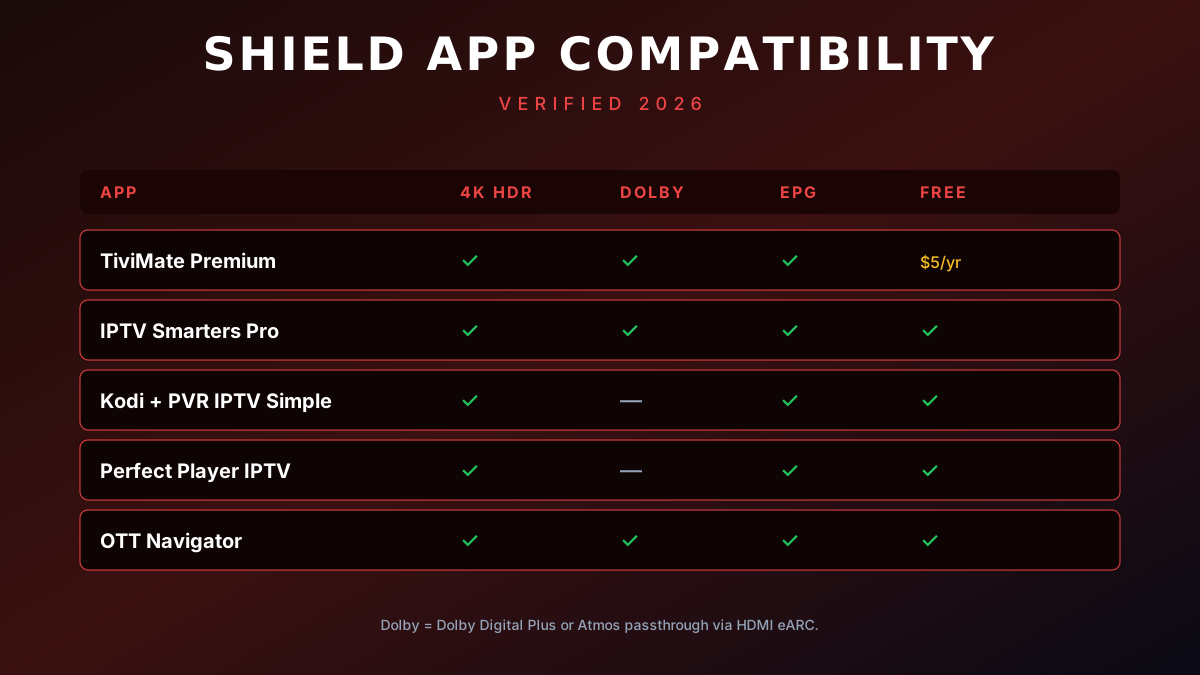
TiviMate remains the gold standard for IPTV on the Shield in 2026. The grid EPG is the smoothest in the category at 60 fps even on a 14-day EPG import, the catch-up TV works flawlessly, and the premium tier's $5/year fee unlocks recording to a USB drive, multi-view, and picture-in-picture. The interface feels like a real cable box — which is exactly what most Shield buyers want. If you only install one app, install this one.
Setup on Shield
TiviMate is not on the Google Play Store, so you sideload it via Downloader. The full walkthrough is in our Fire TV TiviMate guide — the steps are identical on the Shield, except the URL goes into the Chrome browser on the Shield instead of Downloader. After install, add your M3U playlist, enable hardware decoding (Settings → Player → Hardware decoding), set the buffer to High, and turn on 'Match frame rate' under Settings → Display.
2. IPTV Smarters Pro — Best free option
If you don't want to pay anything, IPTV Smarters Pro is the best free IPTV player on the Shield. It has multi-screen support, parental controls, an integrated EPG, and an in-app remote-friendly keyboard. The free version shows ads; the $5 lifetime upgrade removes them and unlocks catch-up recording. Setup is the simplest of the bunch — install from the Play Store, log in with your Xtream Codes API credentials, and you're done in 90 seconds. Our Smarters on Android TV guide has the full walkthrough.
3. Kodi + PVR IPTV Simple Client — Best for power users
Kodi is overkill for casual users but unbeatable for people who want full control. With the official PVR IPTV Simple Client add-on, Kodi turns into a Swiss Army knife of media playback: live TV, recorded shows, movies from your NAS, YouTube, Plex, and a fully themeable interface. The catch is that you need to spend 20 minutes configuring it, and Dolby Atmos passthrough requires a manual audio setting change (Tools → Settings → System → Audio → Audio output = Optimised, then enable passthrough). For Shield owners who already use Kodi for their local library, this is the natural choice.
4. Perfect Player IPTV — Best lightweight pick
Perfect Player has been around since the early days of IPTV and it shows — the UI is utilitarian, not pretty, but it works. The EPG grid loads fast, channels zap in under a second, and the app is tiny (under 10 MB). If you have an older Shield (the 2017 non-Pro model) or you simply want a no-nonsense player that does one thing well, this is the one. Setup is M3U URL only (no Xtream Codes), and the app remembers the last 7 days of EPG even after a reboot.
5. OTT Navigator — Best for advanced EPG
OTT Navigator is the dark horse of the list. It supports an unmatched variety of EPG sources (XMLTV, JTV, built-in providers), has a 14-day EPG with programme artwork, and is the only player that handles catch-up streams from multiple providers in a single unified interface. The interface takes a weekend to learn, but once you have it dialled in, it's the most powerful option on the market. Highly recommended for advanced users who run multiple IPTV providers.
Recommended Shield settings for 4K HDR IPTV
Display
Set Resolution to 'Auto', turn on 'Match frame rate' and 'Match dynamic range' (Settings → Device Preferences → Display & Sound → Match frame rate / Match dynamic range). This forces the Shield to switch to the source's native resolution and HDR format on every channel change. The picture quality is dramatically better than letting the Shield upscale everything to 4K SDR.
Audio
For Dolby Atmos / DTS:X passthrough, set 'Audio output' to 'Auto' and enable 'Dolby Atmos processing'. For a basic 5.1 setup, switch to 'Stereo' and let your soundbar downmix. The Shield's audio engine is the best in the Android TV category by a wide margin.
Network
Always use Ethernet. The Shield's Wi-Fi is fine for SD/HD, but for stable 4K HDR streams, an Ethernet cable eliminates 95% of the buffering issues people encounter. The Shield supports gigabit Ethernet, so even a $15 Cat-6 cable is enough.
Trusted external resources
For deeper background on the apps we tested, these are the official sites:
- TiviMate — official site (premium subscription + APK)
- IPTV Smarters — official site
- Kodi — open-source media center
- Nvidia Shield — official device support
Need a hand?
Our 24/7 WhatsApp support team can remote-diagnose any player issue on your Shield, recommend the best M3U settings for your specific TV, and even pre-configure your playlist before it ships. If you're just getting started, the 24-hour free trial on our trial page is the fastest way to see whether the Premium plan is right for your household — no credit card, no commitment.